
AndaSeat Examines Independent Screen and Work-Surface Adjustment With Axis Monitor Arm and Xtreme Desk
SPOKANE, WA, UNITED STATES, July 30, 2026 /EINPresswire.com/ -- AndaSeat has published a workstation configuration note addressing the distinction between work-surface height and display position in sit-stand desk setups.
The note examines why raising or lowering an entire desk does not necessarily preserve the same relationship among the user’s elbows, eyes, keyboard, mouse and monitor. It also outlines how the Axis Single Monitor Arm and Xtreme Series standing desk provide separate controls for these two parts of a workstation.
A height-adjustable desk moves the keyboard, mouse, monitor and other desktop equipment together. During a transition from sitting to standing, however, the preferred height of the input devices may not change by exactly the same amount as the preferred position of the display.
Published ergonomics research has reported posture-dependent differences in monitor position relative to the work surface. Public workstation guidance also commonly treats desk height and display position as related but separate measurements.
The configuration note does not prescribe one position for every user. Its purpose is to identify the available adjustment points and explain how they interact within a workstation.
Work-Surface Height and Display Position Serve Different Functions
Work-surface height affects the relationship among the shoulders, elbows, forearms, wrists, keyboard and mouse.
Display position affects viewing distance, screen angle and the direction in which the head and eyes are oriented. These measurements influence each other, but they are not interchangeable.
The Canadian Centre for Occupational Health and Safety advises that a standing work surface should generally correspond with the user’s standing elbow position. Its monitor guidance separately addresses viewing distance and recommends placing the screen around eye level or slightly below, subject to the user, display and task.
The U.S. Occupational Safety and Health Administration similarly evaluates monitors together with the chair, desk and input devices. OSHA guidance recommends monitor support that permits changes in distance, height, tilt and orientation.
These recommendations do not establish one fixed measurement for every workstation. Body dimensions, screen size, task, desk equipment and visual requirements can affect the final configuration.
Within the setup described in AndaSeat’s note, the Xtreme Series changes the height of the complete work surface. The Axis Single Monitor Arm changes the position of the display relative to that surface.
Xtreme Series Sets the Work-Surface Level
The Xtreme Series provides motorized height adjustment from 28.7 to 46.1 inches, or 730 to 1,170 mm.
Its single-motor system moves at 22 mm per second and operates at a company-rated noise level below 50 dB. The desk supports a total load of up to 155 pounds, or 70 kg.
Three memory presets allow selected desk heights to be stored through the digital control panel. A user can assign these presets to seated, standing or other frequently used positions without manually locating the same height during each transition.
The control panel also includes a real-time height display, adjustable sedentary reminder, child lock and anti-collision function. The anti-collision system is designed to stop and reverse desk movement when an obstruction is detected beneath the moving surface.
These controls determine the position of the full desktop. They do not independently change the relationship between the monitor and the keyboard after the surface reaches a stored height.
The Xtreme work surface is available in black or white. Current official U.S. specifications list 47.2 × 29.5-inch and 55.1 × 29.5-inch desktop configurations. Both use an 18 mm MDF desktop.
The two sizes provide different amounts of horizontal workspace while retaining the same listed depth. Equipment arrangement remains dependent on monitor size, input devices, accessories and the selected mounting position.
The desk structure uses a cold-formed steel T-frame with dual support beams, extended side brackets, two-stage legs and wide desk feet. AndaSeat states that these components are intended to manage front-to-back and side-to-side movement during typing, mouse use and height changes.
Axis Single Monitor Arm Sets the Display Position
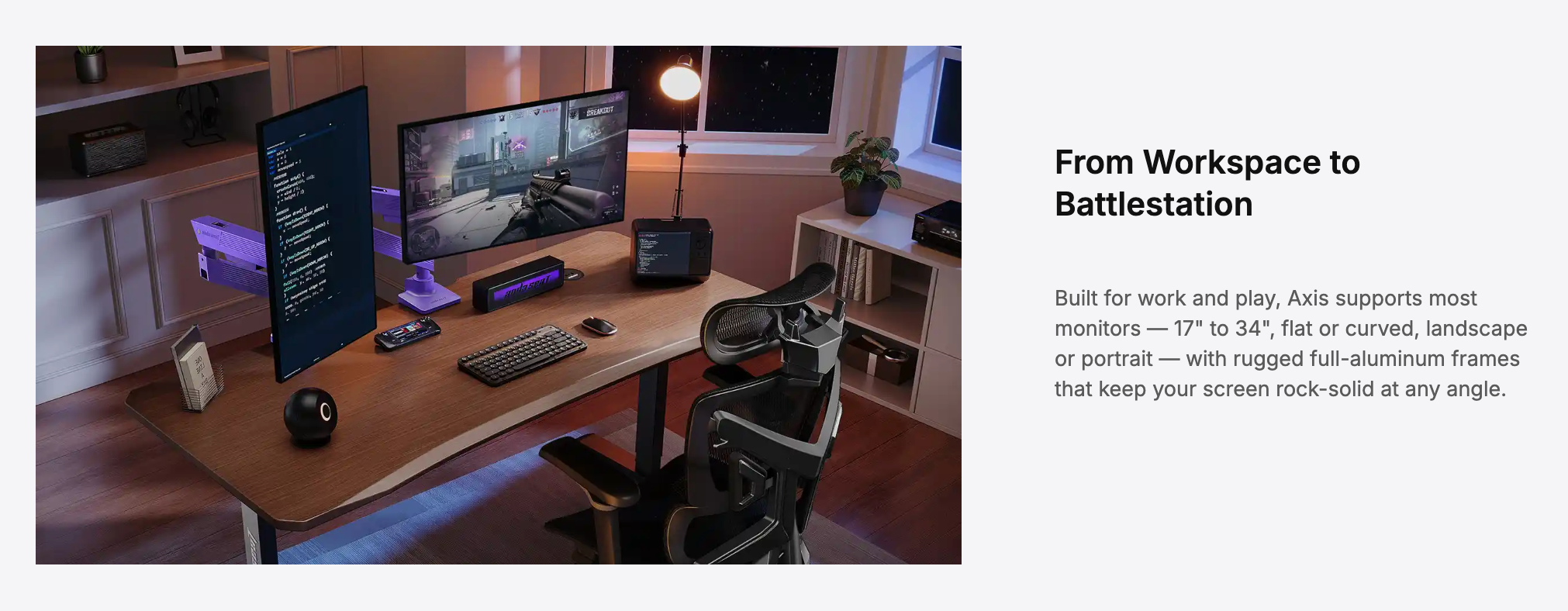
The Axis Single Monitor Arm supports displays from 17 to 34 inches and weights from 3 to 11 kg.
It is compatible with 75 × 75 mm and 100 × 100 mm VESA mounting patterns. Compatible flat and curved monitors can be installed in landscape or portrait orientation.
The arm provides a 10.8-inch vertical lift range. It also supports tilt from -25 degrees to +90 degrees, swivel from -90 degrees to +90 degrees and 360-degree screen rotation.
These movements allow the display to be repositioned without changing the selected height of the keyboard, mouse and other equipment resting on the desk.
After the Xtreme Series reaches a stored standing height, the monitor can be raised, lowered, tilted or moved closer to or farther from the user through the Axis arm. When the desk returns to a seated preset, the display position can be changed again without altering the work-surface setting.
The amount of adjustment required may vary by screen format.
A wider display may require a different viewing distance from a smaller monitor. A portrait-oriented display may require a lower mounting position so that its upper edge does not extend beyond the user’s preferred viewing area.
These examples describe possible configuration changes rather than required settings. The final position remains dependent on the user, workstation and task.
Mechanical Components Manage Different Types of Movement
A monitor arm attached to a standing desk must support the display while the desktop is stationary and while it moves between heights.
The Xtreme frame supports the complete work surface and the equipment placed on or mounted to it. The Axis arm provides a separate support structure for the attached display.
Axis uses a full aluminum frame, an adjustable mechanical spring and a one-way torque hinge at the head joint.
The mechanical spring counterbalances the monitor’s vertical load and can be adjusted for displays within the supported weight range. The one-way torque hinge permits upward tilt while applying additional resistance against unintended downward movement.
Tilt tension can also be adjusted according to the weight and structure of the attached monitor.
These components perform separate functions. The desk frame carries the workstation platform. The arm spring manages the monitor’s vertical position, while the head joint controls the final screen angle.
Users must adjust the arm according to the supplied instructions and remain within the stated monitor-size and weight limits.
Cable Routing Must Allow Desk and Monitor Movement
A sit-stand setup with an adjustable monitor arm creates two cable-movement paths.
The desk moves vertically between seated and standing heights. Above the work surface, the monitor arm can extend, retract, tilt, rotate and move vertically.
Cables therefore require sufficient length for both movements without hanging into the user’s workspace or becoming stretched at the limits of travel.
The Xtreme Series routes insulated power cabling through the desk’s left leg. It also includes an under-desk steel cable tray for power strips and excess cable length.
The tray uses an open-side design that retains access to the stored cables. Cable placement should leave sufficient slack for the desk to complete its vertical range without pulling on connected equipment.
Axis includes magnetic cable sheaths on its upper and lower arms. These covers guide monitor power, HDMI, DisplayPort and USB cables along the arm while allowing them to be accessed for replacement or rerouting.
Within the configuration described in the note, Xtreme manages power distribution and excess cable below the desktop. Axis manages the final cable route between the desktop and the moving display.
The products do not determine cable length automatically. Users must confirm that each connection can accommodate the intended desk and arm movement before operating the setup.
Clamp and Grommet Options Address Different Installation Conditions
Axis can be attached to the rear edge of the Xtreme desktop through a clamp mount or installed through an existing desk opening with a grommet mount.
The clamp installation supports desktop thicknesses from 10 to 40 mm. The grommet installation supports thicknesses from 10 to 70 mm.
The 18 mm Xtreme desktop falls within both stated thickness ranges. Installation remains subject to the selected location, available clearance and the supplied assembly instructions.
The clamp method attaches the arm to the desktop edge without requiring an existing opening. The grommet method places the mounting hardware through a compatible hole in the desktop.
Axis also uses a slide-and-lock quick-release VESA plate. The plate can be attached to the monitor before being inserted into the arm, allowing the screen to be installed or removed without detaching the complete arm assembly from the desk.
The product includes both clamp and grommet mounting hardware.
Xtreme is supplied with its steel cable tray, retractable headphone holder, cup holder and reusable cable ties. These accessories can be installed according to the available desktop space and equipment arrangement.
Configuration Can Be Completed in Stages
The workstation does not need to be calibrated through one adjustment.
The Xtreme Series can first be assembled and operated without the monitor arm. Seated and standing heights can then be stored through the control panel after the desk has been positioned in the room.
Axis can subsequently be installed at a compatible location along the rear edge or through an available desk opening. After the monitor is attached, the mechanical spring, tilt tension, viewing distance, screen height and cable slack can be adjusted.
Users should test the complete desk-height range after installation to confirm that the display, cables and surrounding objects do not interfere with movement.
The setup process may also need to be repeated when the monitor, desktop equipment or primary user changes.
A larger screen can alter the preferred viewing distance and spring setting. Switching from landscape to portrait orientation can change the required display height. Moving a keyboard or other input device can affect the selected desk position.
These are configuration variables rather than product-performance claims.
Separate Controls Address Separate Workstation Measurements
The Xtreme Series changes the complete work surface across a 28.7- to 46.1-inch height range. The Axis Single Monitor Arm then changes the monitor’s position relative to that surface through height, distance, tilt, swivel and rotation adjustments.
The arrangement reflects the distinction identified in workstation guidance: the preferred relationship between the arms and work surface may not require the same adjustment as the preferred relationship between the eyes and display.
The configuration note does not identify a universal sitting or standing position. It outlines how separate controls can be used when configuring work, gaming, creator and shared home environments.
Regional product specifications and availability for the Axis Single Monitor Arm and Xtreme Series standing desk may vary.
About AndaSeat
Founded in 2007, AndaSeat develops ergonomic furniture and workspace products for gaming, professional, creator and home environments. Its portfolio includes ergonomic chairs, standing desks, monitor arms and related workspace accessories.
Caroline Chen
AndaSeat
+86 139 2232 2347
Visit us on social media:
Legal Disclaimer:
EIN Presswire provides this news content "as is" without warranty of any kind. We do not accept any responsibility or liability for the accuracy, content, images, videos, licenses, completeness, legality, or reliability of the information contained in this article. If you have any complaints or copyright issues related to this article, kindly contact the author above.

Media gallery